The 12 basic principles of animation is founded by Ollie Johnston and Frank Thomas. They have publish a book "The Illusion of Life Disney Animation" which aims to produce more realistic animations.
The purpose of creating all these principles was to produce an illusion of characters according to the basic laws of physics and they also will be handling with more complicated issues such as emotional timing animation and character own appeal.
referring it as "the bible of animation", to this date, it is still widely use in the animation industry in both hand-drawn animation and computer animation.
Sunday, February 12, 2012
❣ the 1 out 3 research
this video is fun and its easy to let us know how is the 12 animation principles being applied to the animation.

❣ 13 Videos
 |
| creating plane n ball |
 |
| setting up camera |
 |
| different view |
 |
| assigning of material |
 |
| adding squash handle |
 |
| squash handle appear |
 |
| creating squash |
 |
| ball being stretch |
The Final Video
my reflection
this assignment is abit draggy as the tutorial teach us start from the basic example from doin it as a project to setting up a grid. its quite useful in the end as i manage to learn quite alot of things.
the question
1)
Do you need to be able to draw well to create good 2D animation? Explain
your view.
nope! though you need to be able to "aga aga" know how to draw the character but you don't need to draw it well as you are able to edit it with the computer to make it more refine.
2) Do you need to be able to draw well to create
good 3D animation? Explain your view.
no!same as before, as long you are able to draw a character, you are able to refine it using the computer with a 3D application. You can get help anywhere everywhere.
3) What do you think would separate a piece
of poor animation from a piece of good animation? In other words, how
would you go about deciding if a piece of animation is good or bad?
how i decide if it is a good animation is based on storyline, the flow of character, the character that is being created and the technique is being used for example is it too fake or what.
4) In 2D animation, you need to be very
aware of timing at a frame by frame level, using timing charts and other
techniques - but for 3D animation, this is handled using the graph editor,
which is more concerned with manipulating rates of change over time.
Does
this affect how you approach your animation work? Explain.
when using frame by frame level, it is not as accurate as using a graph editor as frame by frame is using what you see and where you click it so it may not be as accurate as using graph editor cause graph editor is represented by numbers and graph.
5) Give a brief critique of Maya as an
animation tool. Don't just say Maya makes animation difficult, or easy, or that
you need to learn a lot of stuff to use Maya - explain what Maya does well and
not so well in terms of creating animation.
❣ The Mech Arm
 |
| adding joints |
 |
| testing out swivel base |
 |
| on/off blend parent |
The Final Video
| my reflection |
| this lesson is easy as mr ken have teach us step by step. i have learn how to parent a item to another item just by a key! it really helps to save us time when we need to do our project |
Saturday, February 11, 2012
❣ Squash 'n' Stretch...
 |
| ball is added to stage and so is squash handle |
 |
| locking "translate_ball_gp" unwanted channel attribute |
 |
| locking "rotate_ball_gp" unwanted channel attribute |
 |
| locking"ball" all channel attribute |
 |
| positioning it into the correct position |
 |
| start to configure the bounce motion using the timeline and translate x,y |
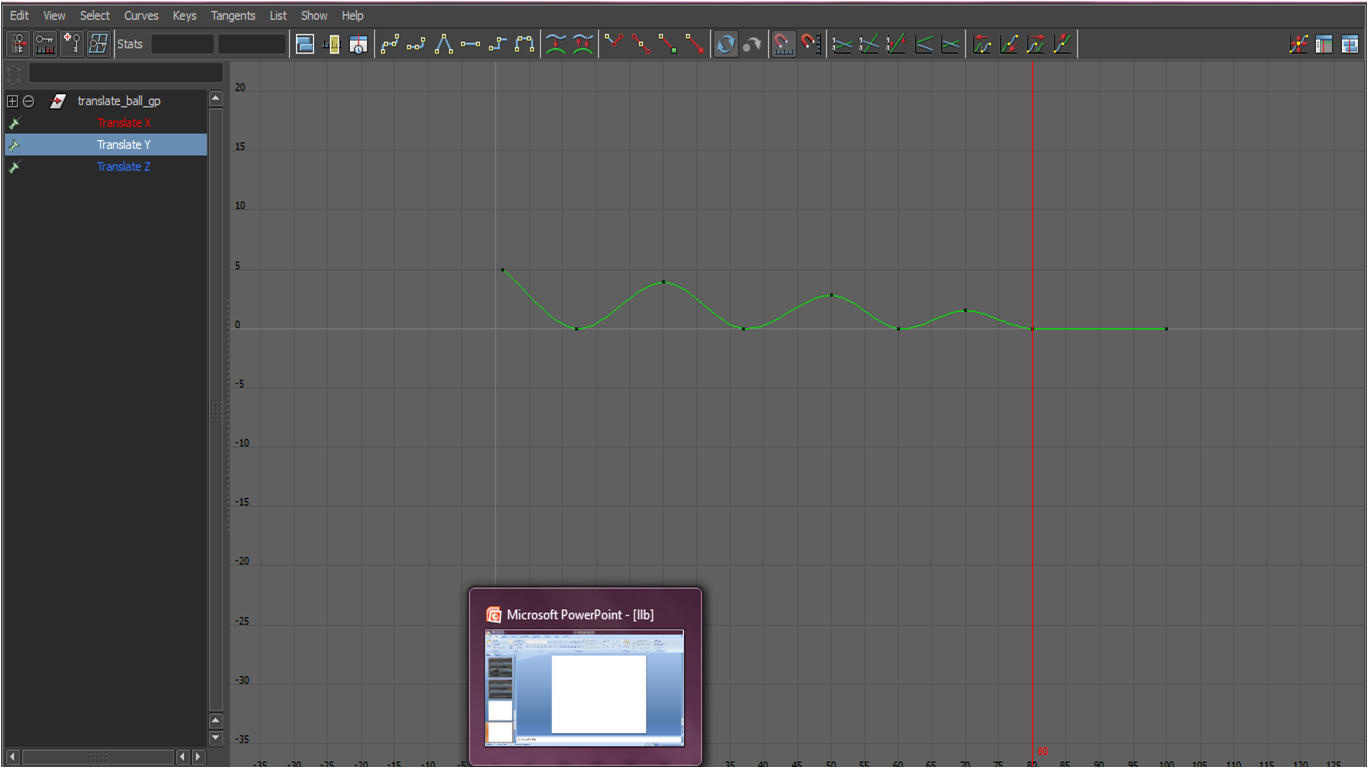 |
| first graph editor before any edit |
 |
| second edit of graph editor |
 |
| third edit of graph editor |
 | ||
| final edit of graph editor. added one more bounce to make it more real |
The Basketball Bounce 'n' Stretch
The Bouncy 'n' Stretchy Ball
my reflection
this exercise is fun and interesting. i am able to explore different way to making the ball to stretch as much as it can and squash as much as it can.
Its funny seeing it how it squash n stretch but i'm having trouble using the number that is given in the tutorial as it puts my balls out of the plane. so the position and the timing it bounce onto the floor will not be the same as it is stated in the tutorial.
the question
1) Why is squash and stretch so useful in animation?
its use for exaggeration and adding fun to it
2) Think of a situation in which extreme squash and stretch could be applied to a character try to be original.
when a baby is playing with play dough
3) Think of an animation example where squash and stretch would NOT be appropriate
when throwing a metal ball as adding squash and stretch will make it look like a rubber
ball instead
4) If squash and stretch doesn't really happen so obviously in real life, why do you think is
it so effective in animation?
it is to create an illusion to give a sense of weight and flexibility to drawn objects
Sunday, February 5, 2012
❣ Bouncing Ball...
 |
| @ the beginning... |
 |
| shifted to the right... |
 |
| move up @ the net area... |
 |
| in the middle to create a bounce... |
 |
| the graph before editing... |
 |
| editing the graph to make the curve more steep... |
 |
| the final graph after which i add more bounce to make it more realistic... |
The Final Outcome...
Friday, February 3, 2012
❣ Project 2: Character & Storyboard
SCENARIO 3
Character:
Hey there, how are you? I’m Armie who is in charge of transferring boxes from one point to another. Oh my freakish god! It’s going to be 6pm and I still have 5 more boxes to go! So stop irritating me and go irritate others.
Storyboard:


Hey there, how are you? I’m Armie who is in charge of transferring boxes from one point to another. Oh my freakish god! It’s going to be 6pm and I still have 5 more boxes to go! So stop irritating me and go irritate others.
Storyboard:


Subscribe to:
Posts (Atom)